
- Key Takeaways
- Engraving, Etching, or Annealing
- Which Metals Can Be Laser Engraved?
- What Do Engineers Mark on Custom Parts?
- Design Rules for Engraving Sheet Metal Parts
- Engraving and Surface Finishing: Get the Sequence Right
- Does Laser Engraving Weaken a Metal Part?
- What Does Engraving Add to Cost and Lead Time?
- FAQ
Laser engraving on metal uses a focused fiber laser to vaporize material from the part's surface, leaving a permanent recessed mark (typically 0.1 to 0.5 mm deep).
Because the mark is cut into the metal itself rather than printed on top of it, the engraving is able to survive handling, cleaning, chemicals, and most abrasion for the lifetime of the part. This is why engineers specify laser engraving for critical information like part numbers, revision levels, serial numbers, and logos on custom sheet metal components.
But there's a catch. For all its advantages, laser engraving is often the wrong tool for the job. It's slower than surface marking, it puts heat into thin sheet, and it can create a corrosion problem on stainless steel.
This guide covers when to engrave vs. when to etch or anneal instead, which metals mark well, and design rules to follow for engraved parts.
Key Takeaways
Laser engraving leaves permanent marks in sheet metal that can handle cleaning, abrasion, and rough handling.
Aluminum, carbon steel, and stainless steel are all suitable materials for laser engraving.
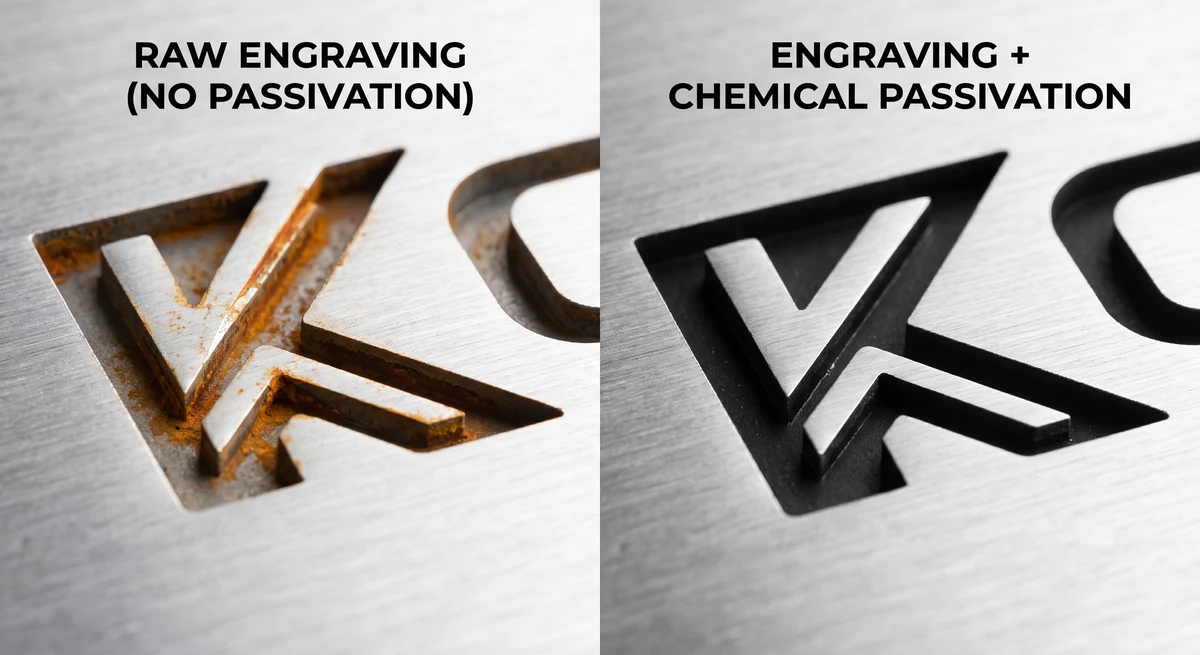
Engraving stainless steel will compromise the protective film on the material's surface and may cause rust to form on the part.
Engraved parts remain strong and durable, but may increase the risk of fractures in parts that flex frequently or are subject to vibrations.
Table of Contents
- Engraving, Etching, or Annealing: Which Should You Specify?
- Which Metals Can Be Laser Engraved?
- What Do Engineers Mark on Custom Parts?
- Design Rules for Engraving Sheet Metal Parts
- Engraving and Surface Finishing: Get the Sequence Right
- Does Laser Engraving Weaken a Metal Part?
- What Does Engraving Add to Cost and Lead Time?
- Frequently Asked Questions
- Wrapping Up
Engraving, Etching, or Annealing: Which Should You Specify?
You should specify engraving for marks that must withstand abrasion or recoating. For most other identification marks, specify surface etching or annealing instead.
All three processes run on a fiber laser operating around 1064 nm. This is the industrial standard because metals absorb near-infrared energy far better than a CO2 laser's 10,600 nm beam. It's the same machine for all three types of marking. The difference is in the power and speed, along with the number of passes.
Annealing heats the metal just enough to create a dark oxide layer beneath the surface. Nothing is removed and the part keeps its exact dimensions and surface finish, which makes it suitable for medical and food-contact equipment.
Etching melts a micro-thin surface layer that expands into a raised, frosted mark. Etching depths run 0.025 to 0.127 mm, versus 0.25 mm or higher for engraving. Melting also takes less energy than vaporizing, which makes it faster, and it produces the highest contrast on most metals.
Engraving vaporizes metal to cut a real recess you can feel by running your fingernail along the surface of the part.
Annealing vs. Etching vs. Engraving
| Process | Effect | Typical depth | Specify it when |
|---|---|---|---|
| Annealing | Oxide layer forms below the surface; nothing removed | None | Stainless steel; dimension- or hygiene-critical surfaces |
| Etching | Surface melts into a raised, high-contrast mark | Up to ~0.13 mm | Logos, serials, barcodes; most ID marks |
| Engraving | Material vaporized, leaving a recess | 0.1–0.5 mm | Marks that must survive abrasion, blasting, or recoating |
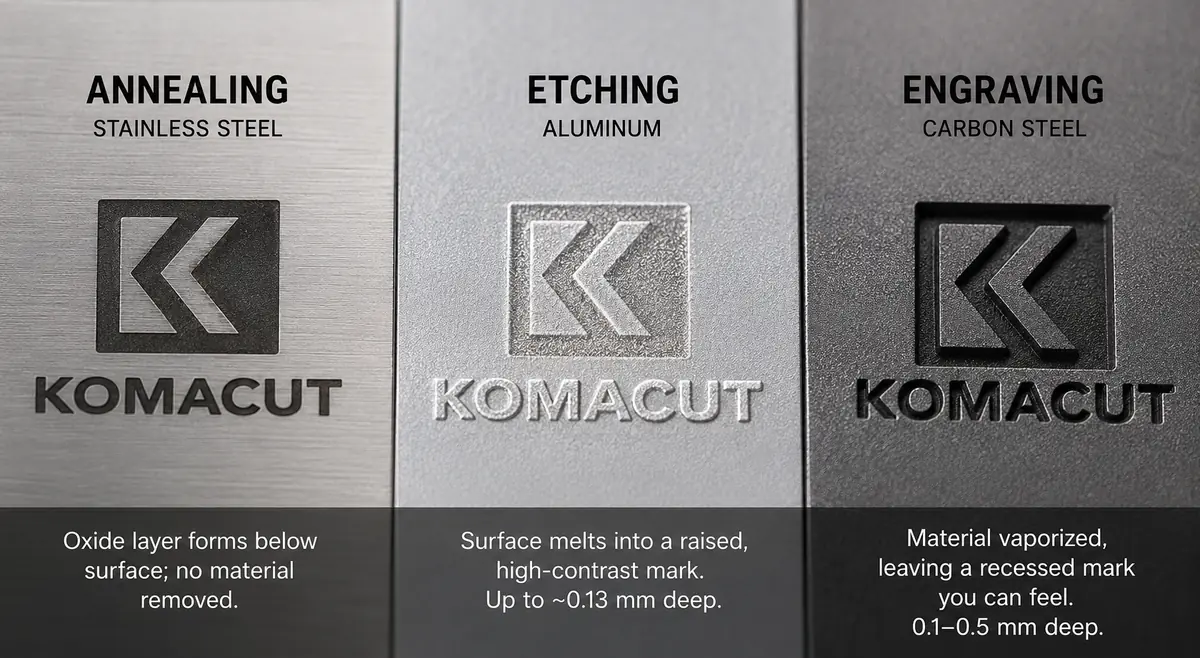
Etching is usually the right method for creating identification marks, because it's faster, cheaper in laser time, doesn't change part dimensions, and reads better because of its contrast.
Deep engraving is only worth the extra cost if the mark is genuinely at risk of abrasion. Parts that get media-tumbled, sandblasted before recoating, or scraped against concrete for twenty years will need engraving to keep their markings present and legible in those conditions.
Which Metals Can Be Laser Engraved?
Aluminum, carbon steel, and stainless steel can all be laser engraved. But some materials take engraving better than others, and laser engraving stainless steel could cause problems.
Aluminum
Aluminum engraves and etches cleanly in bare form (including 5052, the standard alloy for formed sheet metal parts).
Anodized aluminum is even better, since the laser strips the colored anodic layer to expose the bright base metal. This produces a sharp contrast at low power.
Carbon Steel
Carbon steel (cold-rolled SPCC and similar grades) takes deep engraving well. The material is inexpensive, tough, usually painted or powder coated, and often ends up in exactly the abrasive environments where a surface mark would wear away.
Stainless Steel
Stainless steel allows you to control the color of the mark you produce. A slow, oxidizing laser will leave a black annealed mark, while rapid surface melting will leave a white one.
However, laser cutting stainless steel comes with a risk. Deep engraving cuts through the protective film that forms on the surface of stainless steel parts. The freshly exposed metal inside the recess creates an area where rust can take hold.
Laser annealing is the best way to prevent corrosion when marking stainless steel parts. But if your drawing calls for engraved stainless on a part that may be exposed to moisture or chemicals, the solution is to put the part through a chemical passivation procedure after marking to restore the protective film. Komacut offers passivation as a standard surface finishing option, so the two operations can be sequenced on one order.
Material Marking Guide
| Material | Marks best with | Watch out for |
|---|---|---|
| Bare aluminum (e.g. 5052) | Etching or engraving | Moderate contrast on bare metal; anodize first if the mark must pop |
| Anodized aluminum | Engraving through the anodic layer | Few downsides; bright base metal against the colored layer is the best contrast available |
| Carbon steel (SPCC/CRS) | Deep engraving | Bare marks will corrode with the part; usually coated afterward |
| Stainless steel (SUS304) | Annealing (black) or surface melt (white) | Deep engraving breaks the passive film; re-passivate if the drawing demands it |
All three material families, in multiple grades and thicknesses, are listed on Komacut's sheet metal materials page.
What Do Engineers Mark on Custom Parts?
- Part Numbers and Revision Levels: Engraved revision codes help you pick out the correct part (and avoid a warranty claim from selecting the wrong one).
- Logos and Functional Text: Including labels, warning symbols, and torque values next to fasteners.
- Serial Numbers and 2D Codes: These ensure that your part remains fully traceable. A data matrix carries the full serial information and scans reliably at only 20% contrast (compared to 80% for traditional barcodes).
Design Rules for Engraving Sheet Metal Parts
These six rules can help you prevent most engraving issues that arise when specifying laser engraving on sheet metal designs.
Send Vector Artwork (Not a Screenshot)
The laser follows vector paths. But there are no vector paths on a JPEG of your logo. Send the right type of file to ensure that your design comes out the way you envision it.
Komacut's laser engraving service takes SVG files (convert text to outlines first so a font substitution doesn't change your mark).
Keep Marks on Flat Faces
If your artwork crosses a bend radius, the mark will stretch and distort when the part is formed. To avoid this, leave sufficient clearance between the mark and the bend zone, just like you would for holes.
Match Depth to the Gauge
Deep engraving concentrates heat, which can cause distortion on thin sheet metal. This makes laser engraving unsuitable for sheets that are under 2.5 mm of thickness.
If you're marking sheets that are 1 to 1.5 mm thick, specify surface etching instead of engraving (and keep the part flat).
Size the Artwork Realistically
Minute details like thin serifs might look crisp on your monitor, but turn to mush when engraved in steel. Make sure your design works within the limitations of the machine.
Komacut accepts engraved designs up to 150 × 150 mm per mark.
Spec the Mark on the Drawing
Call out the specific process (engrave, etch, or anneal), the depth minimum or maximum (where it matters), and the location of the mark.
Adding "engrave here" with no specified depth leaves the decision up to whoever programs the laser.
Decide the Finishing Sequence Before You Order
You can coat the metal before engraving it, or engrave it first. Either option works, but the sequence you choose will change the appearance of the mark.
Engraving and Surface Finishing: Get the Sequence Right
Should you mark first or finish first? Both are acceptable, but they produce different results.
Marking Before vs. After Finishing
| Sequence | Resulting mark | Choose it for |
|---|---|---|
| Engrave bare metal, then coat | Textured impression showing through the paint or powder coat, same color as the part, protected by the coating | Traceability marks that need to exist, not advertise |
| Finish first, then engrave through the coating | Coating removed locally to expose base metal: bright mark on dark powder coat, silver detail on black anodized | Logos and legends that must be read at a glance |
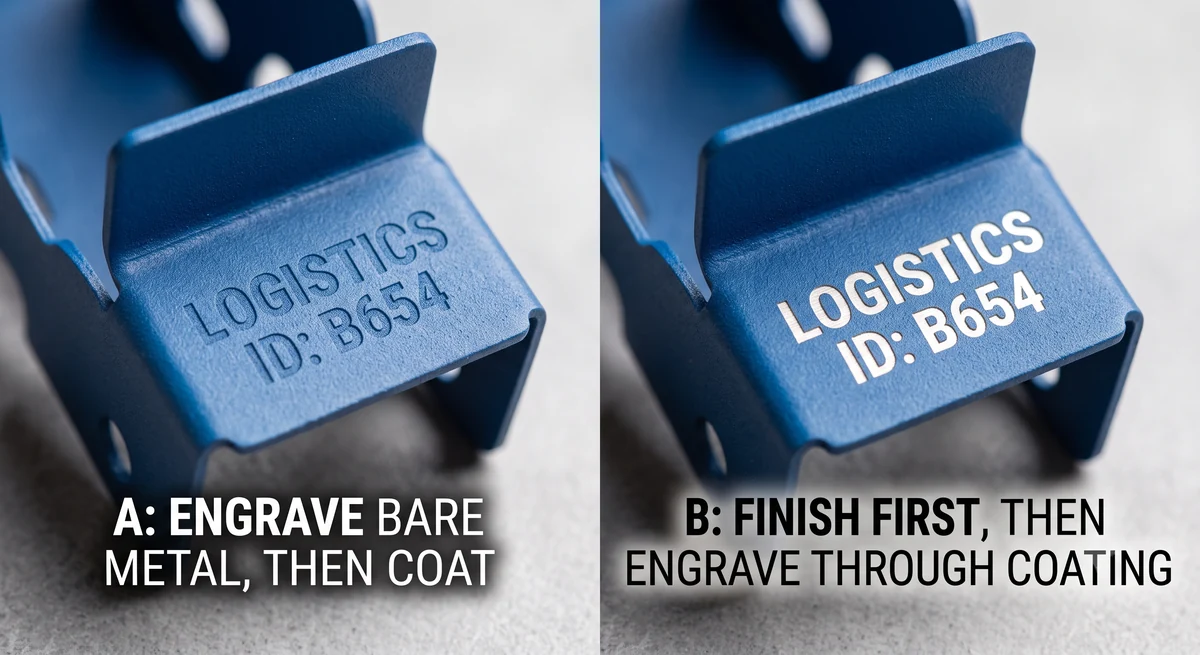
Komacut engraves on both powder-coated and anodized surfaces, so either sequence can be specified.
Several major online cutting services either don't offer engraving at all or can't combine it with finishing operations, which pushes the mark to a second vendor (introducing a second lead time and a sequencing risk). At Komacut, laser cutting, bending, finishing, and engraving run in the same facility on one order, so the sequence is specified once and controlled internally.
Does Laser Engraving Weaken a Metal Part?
Laser engraving does weaken the part somewhat. For parts that are mostly static (like enclosures, panels, or fixed brackets), it won't be enough to make a real difference. But for parts that undergo cyclical load, engraving can affect the durability of the part.
An engraved recess is a notch, and notches concentrate stress. Research on laser-marked titanium medical implants found that cracks are more likely to form where serial numbers are engraved. The engraved area also had measurably reduced fatigue strength (compared to unmarked specimens). An ASTM technical paper confirmed this, finding that laser-marked samples showed lower fatigue strength.
Medical implants are an extreme case, but the same principle applies to anything that flexes frequently. Suspension components, vibrating panels, and spring elements are all at higher risk of fracture if they've been engraved.
For practical purposes, this means you should specify annealing or shallow etching instead of deep engraving on parts that undergo a cyclical load. Keep marks away from bends, holes, and load paths, and avoid sharp internal corners in the artwork.
What Does Engraving Add to Cost and Lead Time?
Very little when it's added to parts already being cut and bent. It's one more program on a machine that's already in the routing. There's no new vendor, no extra freight, and no separate quote cycle.
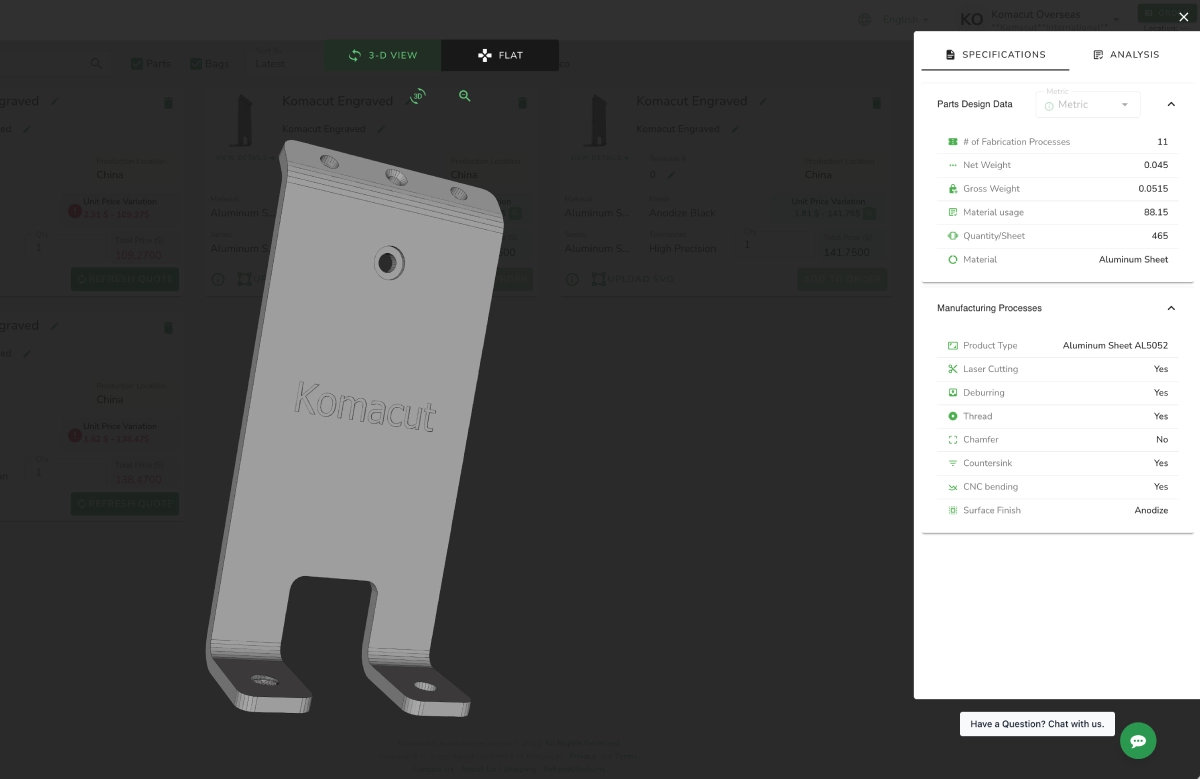
On the Komacut platform, the quoting engine automatically detects engraved features in your 3D model, prices them in the instant quote, and prompts you for the SVG artwork at ordering. There's no minimum order quantity, so a single marked prototype prices the same way a production run does.
For general design questions beyond marking, the sheet metal design guides cover bend radii, hole placement, and tolerances.
Instant Engraving Pricing
Try Komacut's instant quotation tool
Upload your 3D model and get an instant price that already accounts for engraved features, material, and finishing, so you can plan and order marked parts with confidence.
Frequently Asked Questions
Does laser engraving on metal wear off?
No. An engraved mark is a recess cut into the metal. That means it will last as long as the surface itself does. The engraving will only wear off if it is ground, machined, or abraded away.
How deep is laser engraving on metal?
Laser engravings are typically 0.1 to 0.5 mm in depth. Laser etching is shallower, at roughly 0.025 to 0.13 mm. Annealing has no depth since it doesn't remove any of the material. Deeper marks can withstand more abrasion but are more expensive to produce and put more heat into the part.
Can you laser engrave stainless steel?
Yes, but the engraving will cut through stainless steel's protective film. Because of this, the mark itself could rust. You can avoid this by specifying laser annealing instead of engraving. If engraving is required, put the part through a chemical passivation process after the mark is added to restore the stainless steel's protective layer.
Can you engrave powder-coated or anodized parts?
Yes. The laser removes the coating locally, exposing the bright base metal against the colored finish. This creates a strong contrast that is more attention-grabbing. Komacut engraves on both powder-coated and anodized surfaces, or on bare metal before finishing when a subtler, coating-protected mark suits the application better.
What file format is needed for laser engraving?
Vector artwork is the ideal file format. Komacut requires SVG files with text converted to outlines, since formats like JPEG and PNG can't drive the laser. If the engraving is modeled in your 3D file, the quoting engine automatically detects it and asks for the SVG when you place the order.
Does laser engraving weaken metal parts?
Yes, but it doesn't make a meaningful difference for static parts like enclosures and fixed brackets. For parts under cyclic loading, however, fatigue cracks can form at the site of the engraving. For parts that are meant to flex or vibrate, specify annealing or shallow etching to preserve their durability.